IEFYX Vendor User Guide
The complete reference for the IEFYX vendor portal — platform overview, every feature module, deployment, integrations, capabilities, use cases and step-by-step workflows.
Table of Contents
1. Introduction
1.1 Platform Overview
IEFYX is a multi-tenant SaaS platform for Threat Exposure Management and penetration-test reporting. It gives security service providers (vendors) a single workspace to onboard client organizations, inventory the applications under assessment, document and triage vulnerabilities, run the full pentest reporting lifecycle, issue assessment certificates, and deliver dashboards and reports to their clients.
The platform is delivered as two cooperating portals built from one codebase:
- Vendor Portal — used by penetration-testing companies, MSSPs and security consultancies (the subject of this guide).
- OEM Portal — used by IEFYX platform operators to onboard vendors and manage subscriptions.
Security Objectives
- Tenant isolation — every record is scoped to the vendor's
organisationand never visible across tenants. - Strong authentication — bcrypt hashing (work factor 12), enforced password policy, optional email 2FA, account lockout.
- Authorization — role-based access control enforced at every write endpoint.
- Auditability — security-relevant actions written to an immutable audit log.
- Upload integrity — magic-byte validation on all uploads.
Key Benefits
Centralized data
One source of truth for clients, assets, findings, reports and certificates.
Faster reporting
Templated reports, bulk import, PDF/HTML generation, reusable content.
Risk-driven
CVSS-derived severity, configurable SLAs, risk scoring and breach tracking.
Integrated
Scanner import, Jira ticketing, Slack/Teams alerts, REST API + API keys.
Target Users
- Penetration-testing companies and security consultancies
- Managed Security Service Providers (MSSPs)
- In-house vulnerability-management and AppSec teams
- Compliance, risk and executive (CXO) stakeholders consuming reports and dashboards
Supported Environments
IEFYX is browser-based. Use a current version of Chrome, Edge, Firefox or Safari with JavaScript and cookies enabled. No desktop client or plug-in is required.
Vendor Responsibilities
- Maintaining accurate client and application inventories.
- Documenting findings with complete evidence, CVSS scoring and remediation guidance.
- Managing their own users, roles and access.
- Keeping their subscription active and within plan limits.
- Safeguarding credentials, API keys and integration secrets.
1.2 Architecture Overview
   Browser ─ Angular 17 SPA (Vendor / OEM portals, route guards, entitlement directives)
       │  HTTPS / Bearer JWT
   Node.js + Express REST API  (protect → restrictToPortal → restrictTo → enforceLimit/requireFeature)
       │
   ┌───┴───────────────┬───────────────────┐
   MongoDB (tenant-     Integrations         Services
   scoped, soft-delete) (scanners·Jira·      (Email/OTP·Razorpay·
                         Slack·Teams)         PDF/GST·CVE)
2. Platform Features
| Module | Route | Purpose |
|---|---|---|
| Dashboard | /vendor/dashboard | Executive risk, vulnerability & compliance overview |
| Customers | /vendor/customers | Client portfolio & engagement lifecycle |
| Applications | /vendor/applications | Application/asset inventory |
| Vulnerabilities | /vendor/vulnerabilities | Findings, CVSS, evidence, retest |
| Scans | /vendor/scans | Trigger scanner jobs & import findings |
| Reports | /vendor/reports | Generate & manage reports (PDF/HTML) |
| Certificates | /vendor/certificate | Issue assessment certificates |
| Integrations | /vendor/integrations | Connect scanners, Jira, Slack, Teams |
| Notifications | /vendor/notifications | In-app alert center |
| Settings | /vendor/settings/* | IAM, users, billing, roles, audit logs, risk config |
2.1 Dashboard
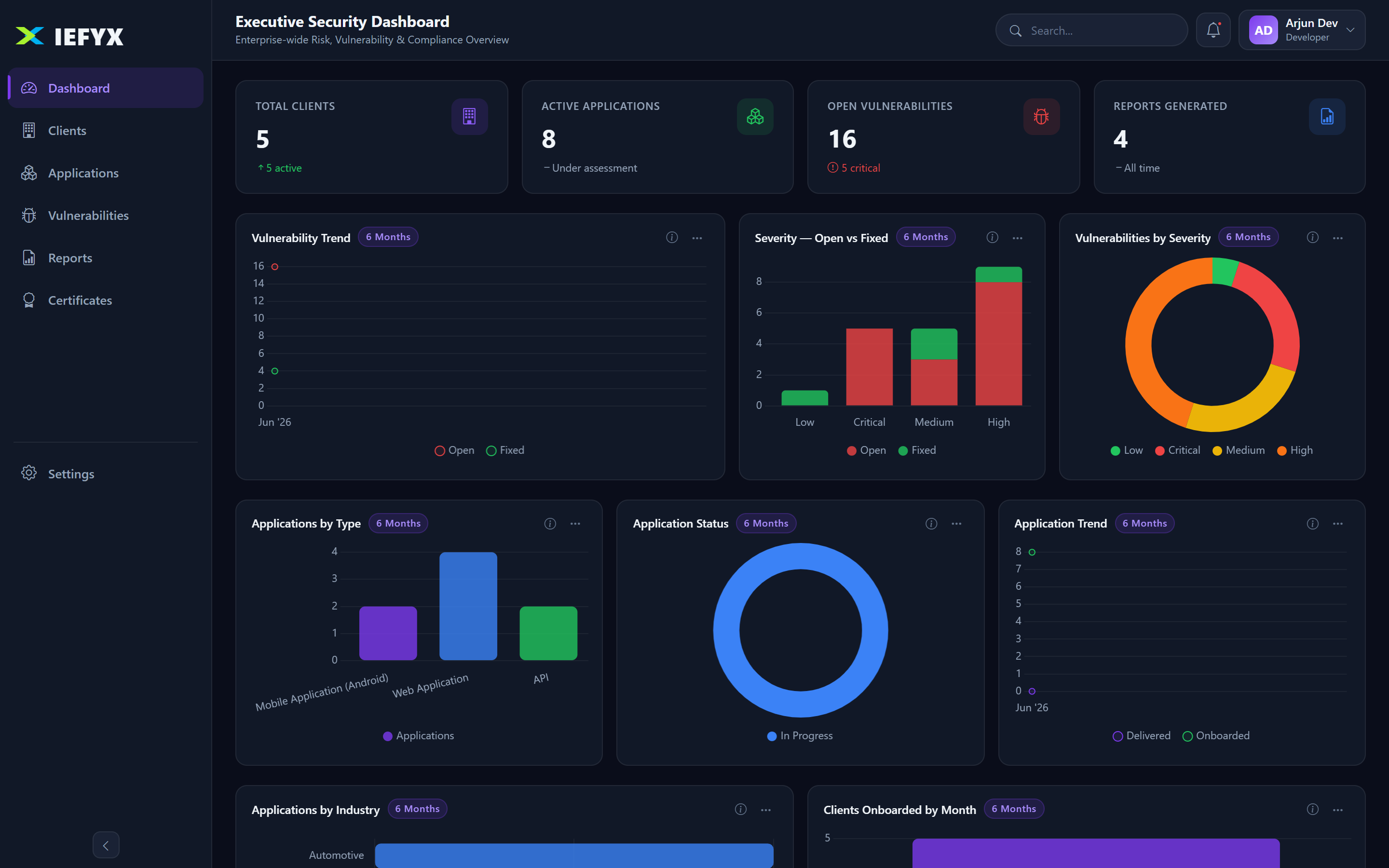
- KPI metrics: total customers, active customers, total applications, open vulnerabilities, open Critical vulnerabilities, total reports.
- Distribution widgets: vulnerabilities by severity & status; applications by type & status.
- Trend widgets (period-aware): monthly vulnerability, application and client-intake trends.
- Recent activity feed across the organisation.
2.2 Customers (Clients)
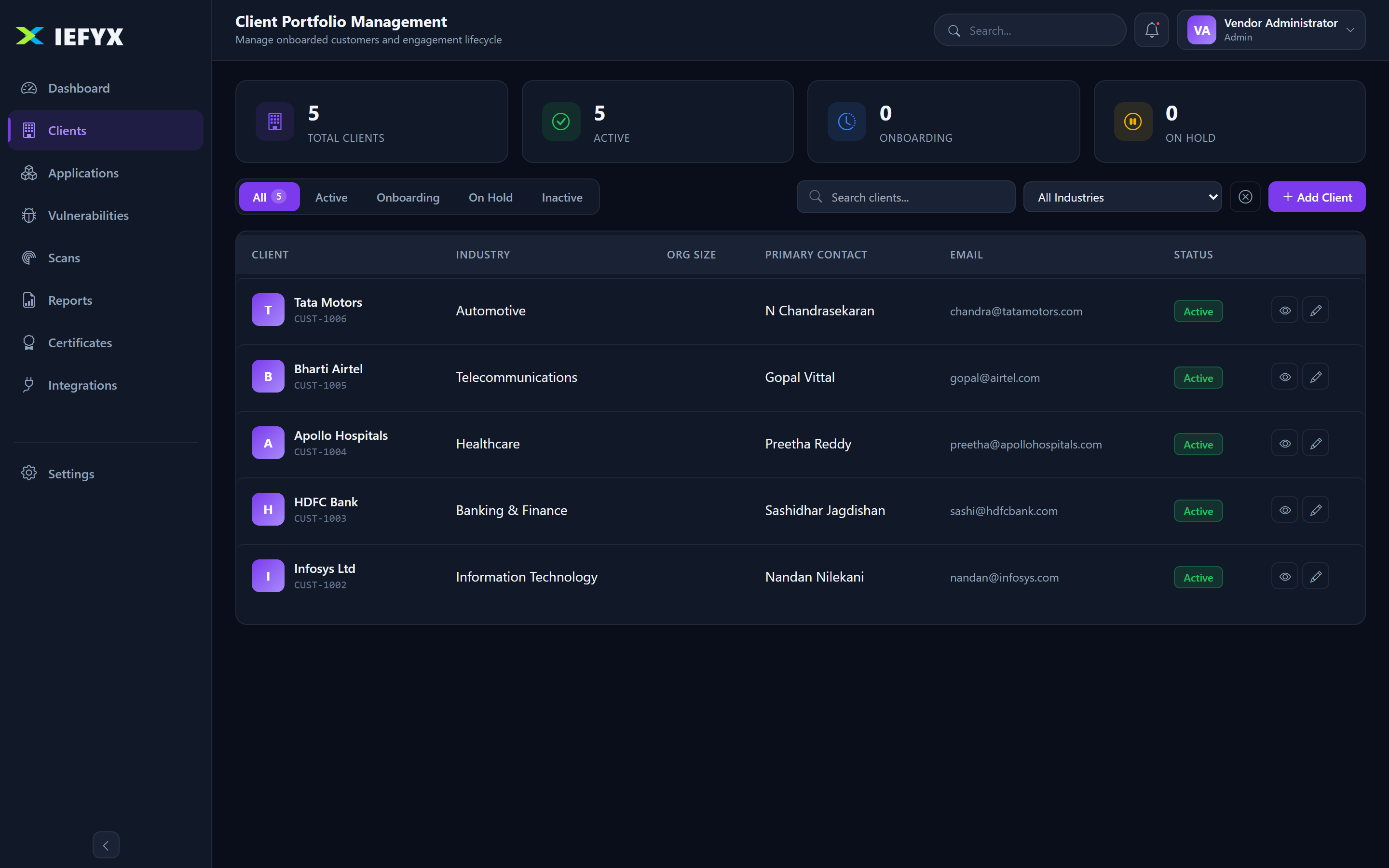
Each customer carries customerId, name, logo, industry, organization size, primary contact, email, phone, address, optional GST number, notes, and a lifecycle status: onboarding → active → hold → deactive. Operations: list, create (with logo), view, edit, change status, soft-delete, restore, permanent-delete (Admin), bulk create.
2.3 Applications (Assessed Assets)
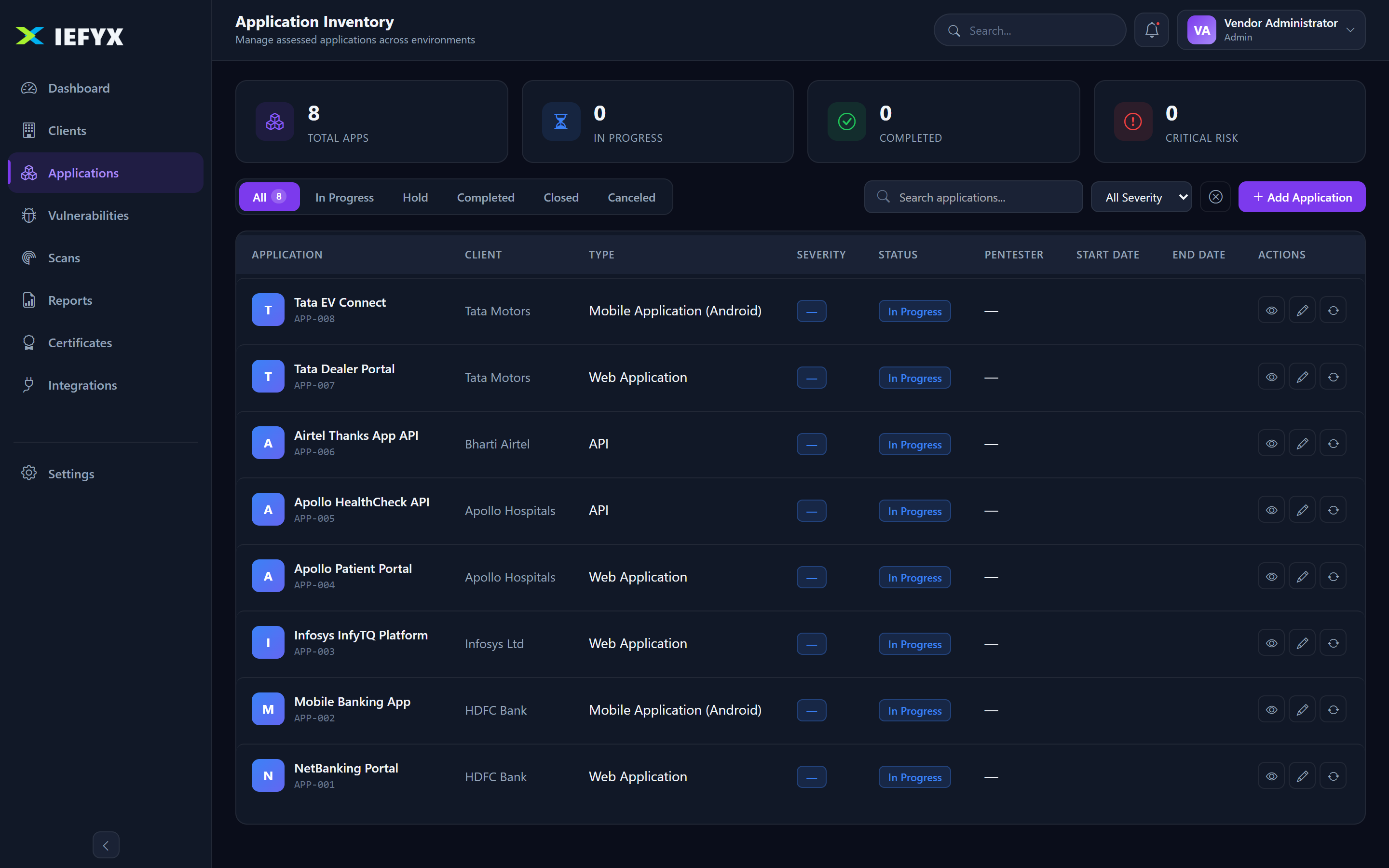
The application record captures the full scoping questionnaire:
- Type: Web, Mobile (iOS/Android), Thick/Thin Client, API, SAP, Blockchain, IoT, OT, AI/LLM, Others.
- Assessment: methodology (SAST/DAST/IAST/MAST/Manual/Hybrid), testing standard (OWASP WSTG/MSTG/PTES/OSSTMM/NIST/Custom), environment (Production/Staging/UAT), scope & out-of-scope, authentication types.
- Technical: page counts, financial transactions, PII handling & types, third-party components, hosting/region, CDN/WAF, prior-assessment history.
- Compliance & risk: compliance scope (PCI-DSS/ISO 27001/SOC 2/HIPAA/GDPR/custom), asset criticality (Tier 1–3), internet-facing flag, business unit.
- Documents & sign-off: architecture/use-case/network diagrams, assigned pentester, prepared/reviewed/approved/released-by, start/end dates.
Status: In Progress · Hold · Completed · Closed · Canceled. Each application also has a timeline and a retest history with its own audit log.
2.4 Vulnerability Management
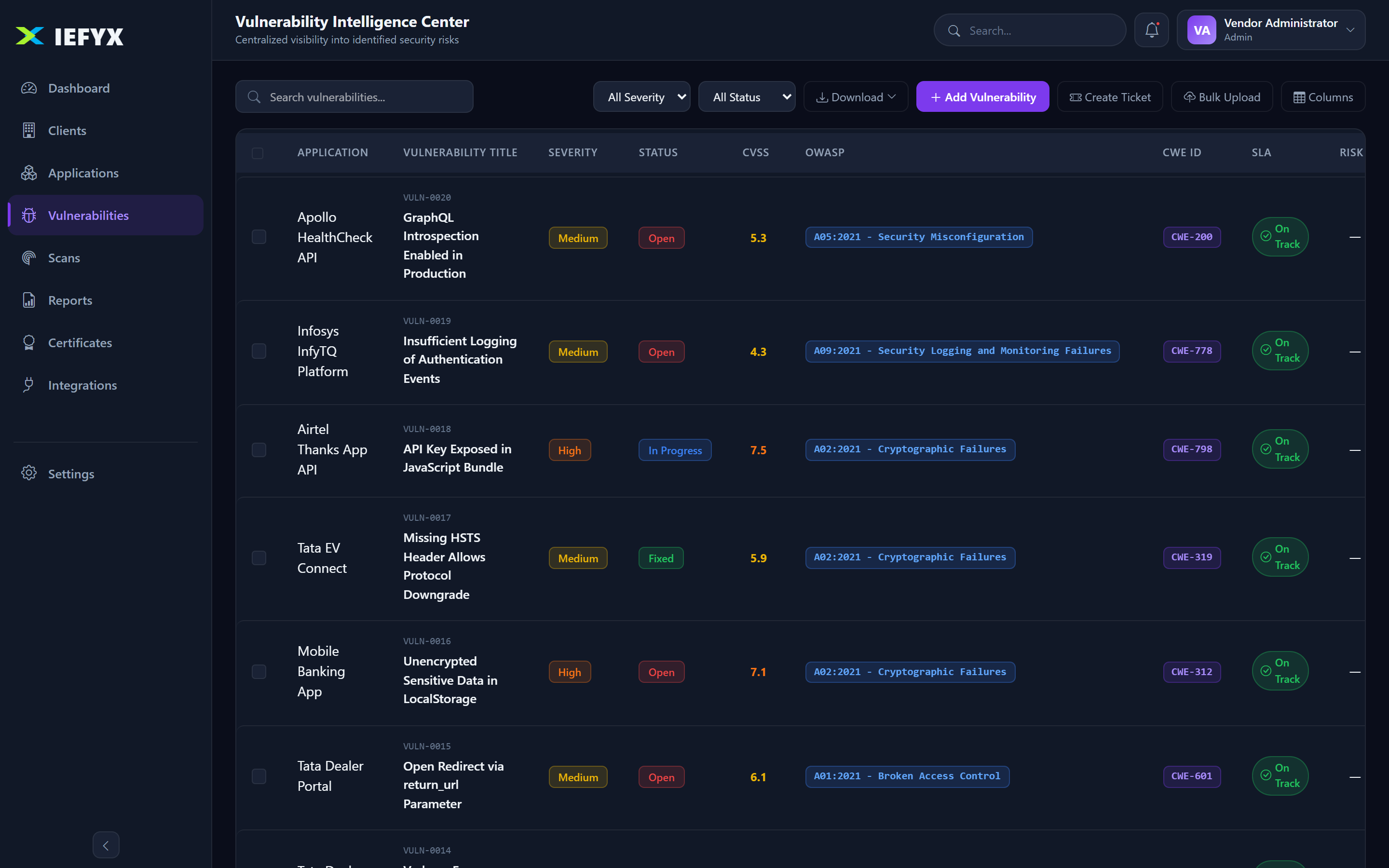
Findings carry a generated vulnerabilityId (e.g. VULN-0001) linked to an application and customer.
Severity & Status
Severity: Critical High Medium Low Information — auto-derived from CVSS when a score is supplied. Status: Open → In Progress → Fixed → Closed, with Hold.
Classification & Intelligence
- CVSS base score & vector (in-app CVSS calculator).
- CWE, OWASP category, one or more CVE IDs (with CVE search).
- MITRE ATT&CK technique/tactic; likelihood rating; risk score (0–100) auto-computed from Risk Configuration; dedup fingerprint.
Evidence, SLA & Retest
- Rich-text Impact, PoC and Remediation (with embedded screenshots) plus plain-text observation and file attachments (magic-byte validated).
- SLA deadline per severity with status On Track/At Risk/Breached (defaults: Critical 1d, High 7d, Medium 30d, Low 90d).
- Retest lifecycle: None → Requested → In Progress → Passed/Failed.
- Bulk import from template (with upload history + error report) and full export.
2.5 Pentest & Assessment Management
An assessment is modeled by the Application record (scope, methodology, schedule, sign-off) plus its findings, retests, reports and certificate. Findings can be created manually, bulk-imported, or imported from a connected scanner. Validation runs through the retest workflow and per-application retest audit log.
2.6 Risk Management
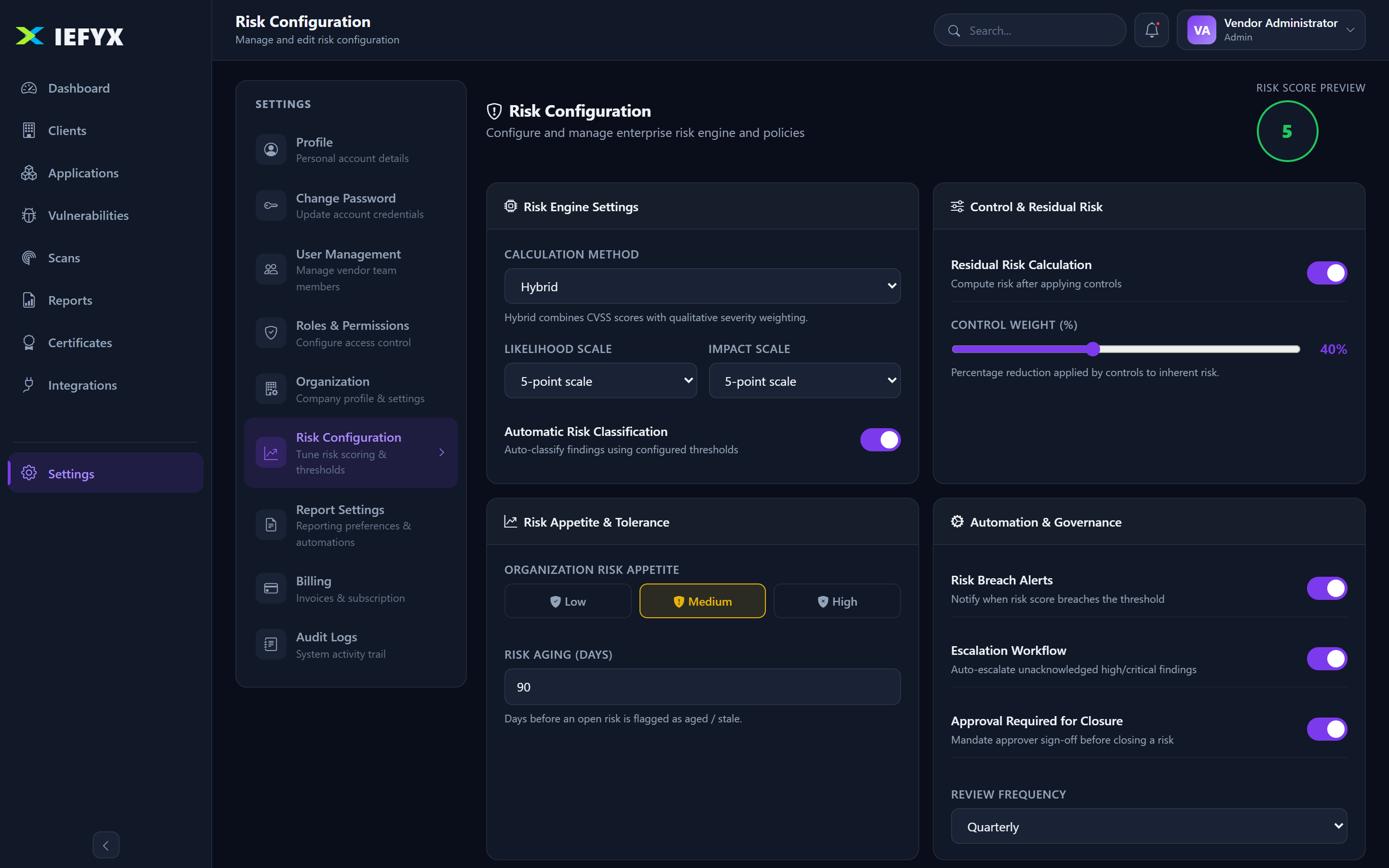
| Setting | Default | Meaning |
|---|---|---|
| Calculation method | Hybrid | How risk score is computed |
| Likelihood × Impact scale | 5 × 5 | Risk-matrix dimensions |
| Risk appetite | Medium | Org tolerance |
| SLA — Critical/High/Medium/Low | 1 / 7 / 30 / 90 days | Remediation deadlines |
| Risk aging | 90 days | Stale-risk threshold |
| Breach alerts / Escalation | Enabled | Notify & escalate on breach |
| Review / Approval | Quarterly / Required | Governance cadence |
Risk acceptance is expressed by moving a finding to Hold/Closed with a justification note, under the configured approval governance.
2.7 Reporting
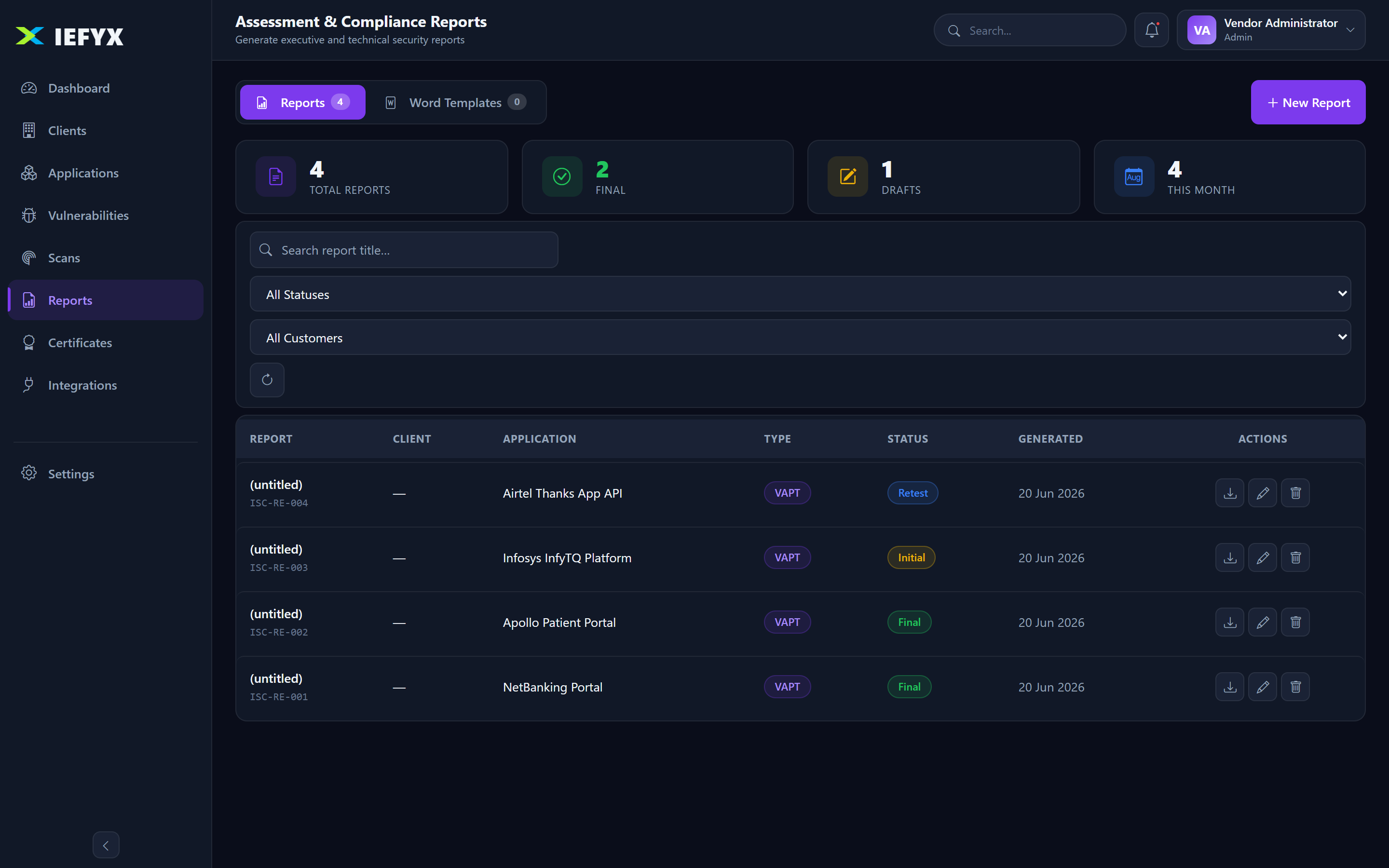
Each report has a reportId, version, status (Draft · Review · Initial · Retest · Final), testing type (Black/Grey/White Box, Red/Purple Team), testing standard, engagement reference, tools used, and narrative fields (executive summary, scope, methodology, overall recommendation). Generate server-side PDF and HTML; upload custom templates and set a default.
2.8 Certificates
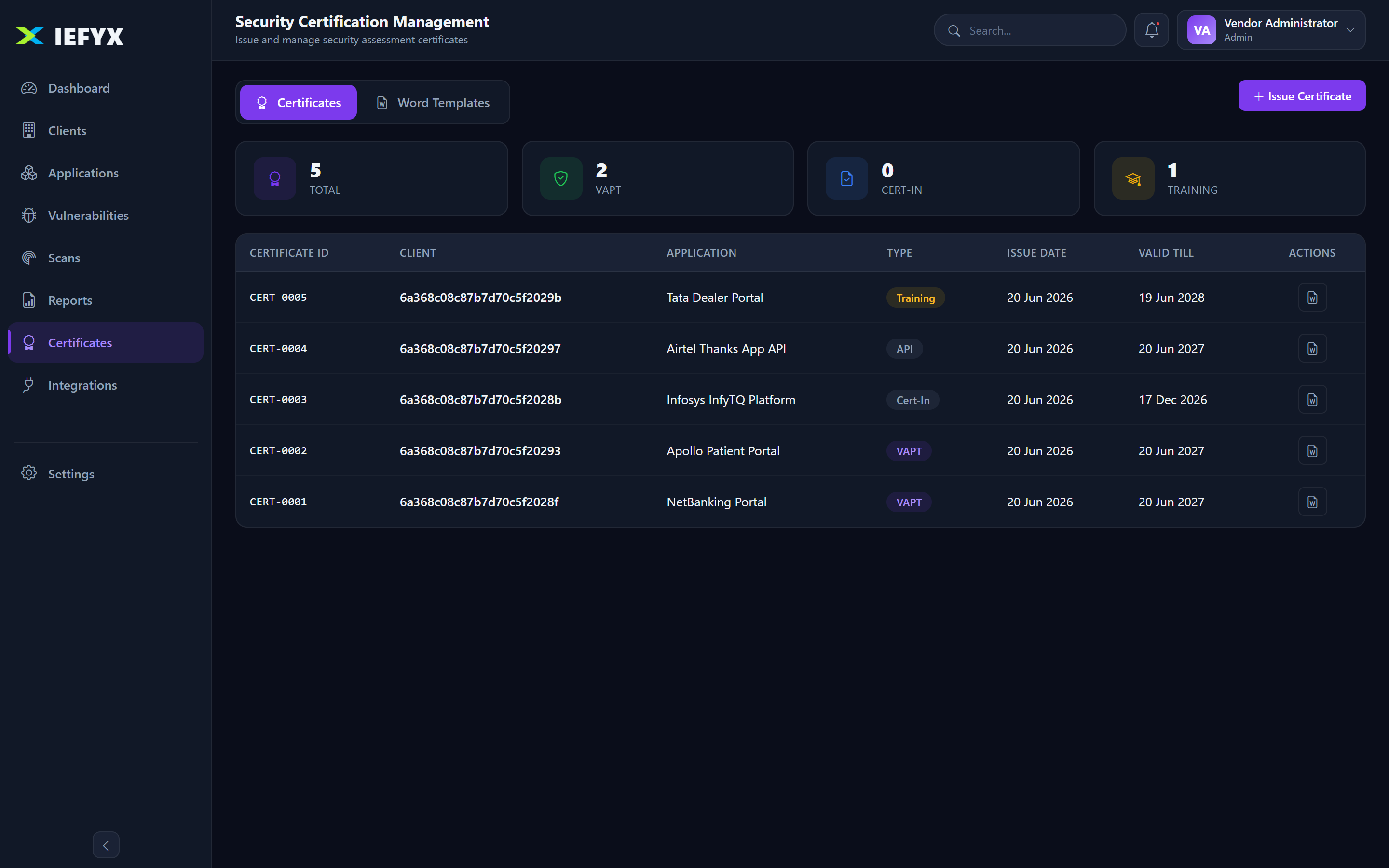
Issue security-assessment certificates per application/customer with templates, issuer, issue/expiry dates, and on-demand generation.
2.9 Users, Roles & Permissions
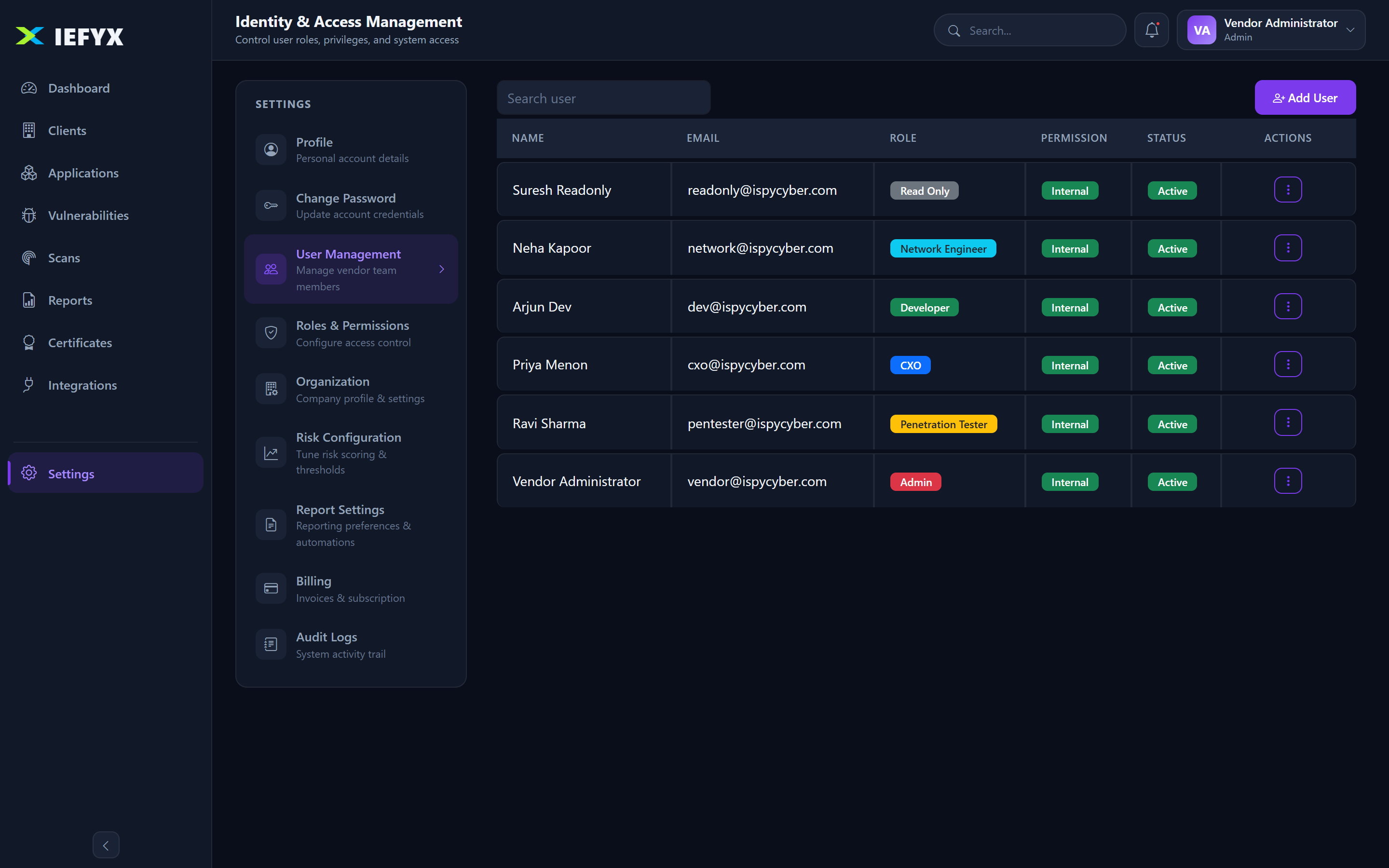
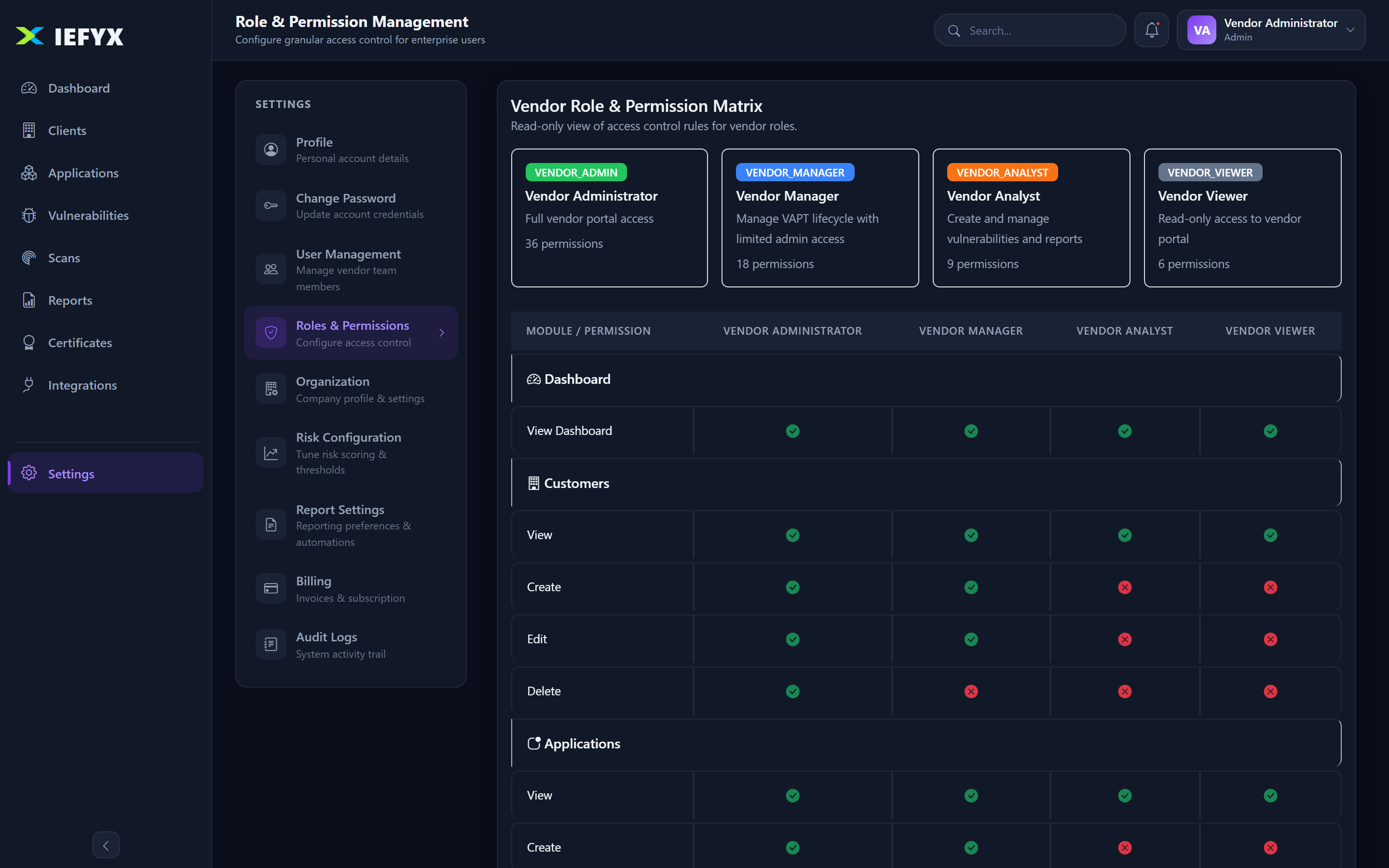
Six roles: Admin, Penetration Tester, CXO, Developer, Network Engineer, Read Only. Each user has an Internal/External scope and Active/Inactive status.
| Capability | Admin | Penetration Tester | Other roles |
|---|---|---|---|
| View modules | ✅ | ✅ | ✅ (per role) |
| Create/edit customers, apps, findings, reports, certificates | ✅ | ✅ | ❌ |
| Trigger scans / push to Jira | ✅ | ✅ | ❌ |
| Delete / restore / permanent-delete | ✅ | ❌ | ❌ |
| Manage users, settings, billing, integrations, API keys, audit logs | ✅ | ❌ | ❌ |
2.10 Notifications
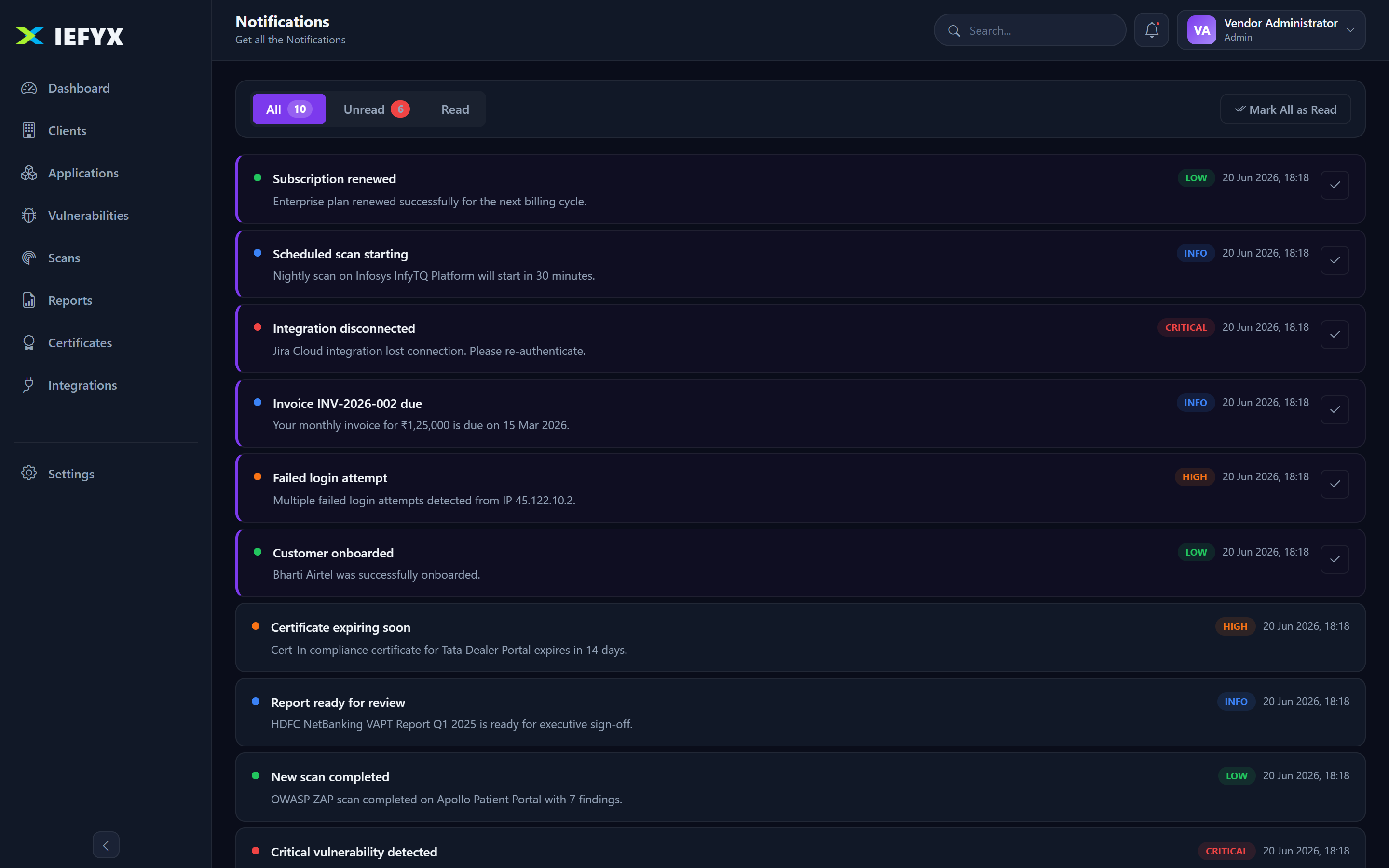
In-app notifications (info/success/warning/error) with unread count and mark-as-read; email alerts for OTP, password reset and account/payment events; SLA breach/escalation driven by Risk Configuration.
2.11 Billing & Subscription
| Plan | ₹/mo | Users | Customers | Applications | Highlights |
|---|---|---|---|---|---|
| Free Trial | 0 (7 days) | ∞ | ∞ | ∞ | All Enterprise features for 7 days, then read-only |
| Starter | 4,999 | 5 | 10 | 10 | Basic dashboard & reporting |
| Professional | 14,999 | 25 | 50 | 100 | Advanced analytics, integrations, API, audit logs |
| Enterprise | 49,999 | ∞ | ∞ | ∞ | All features incl. SSO, white-label, AI |
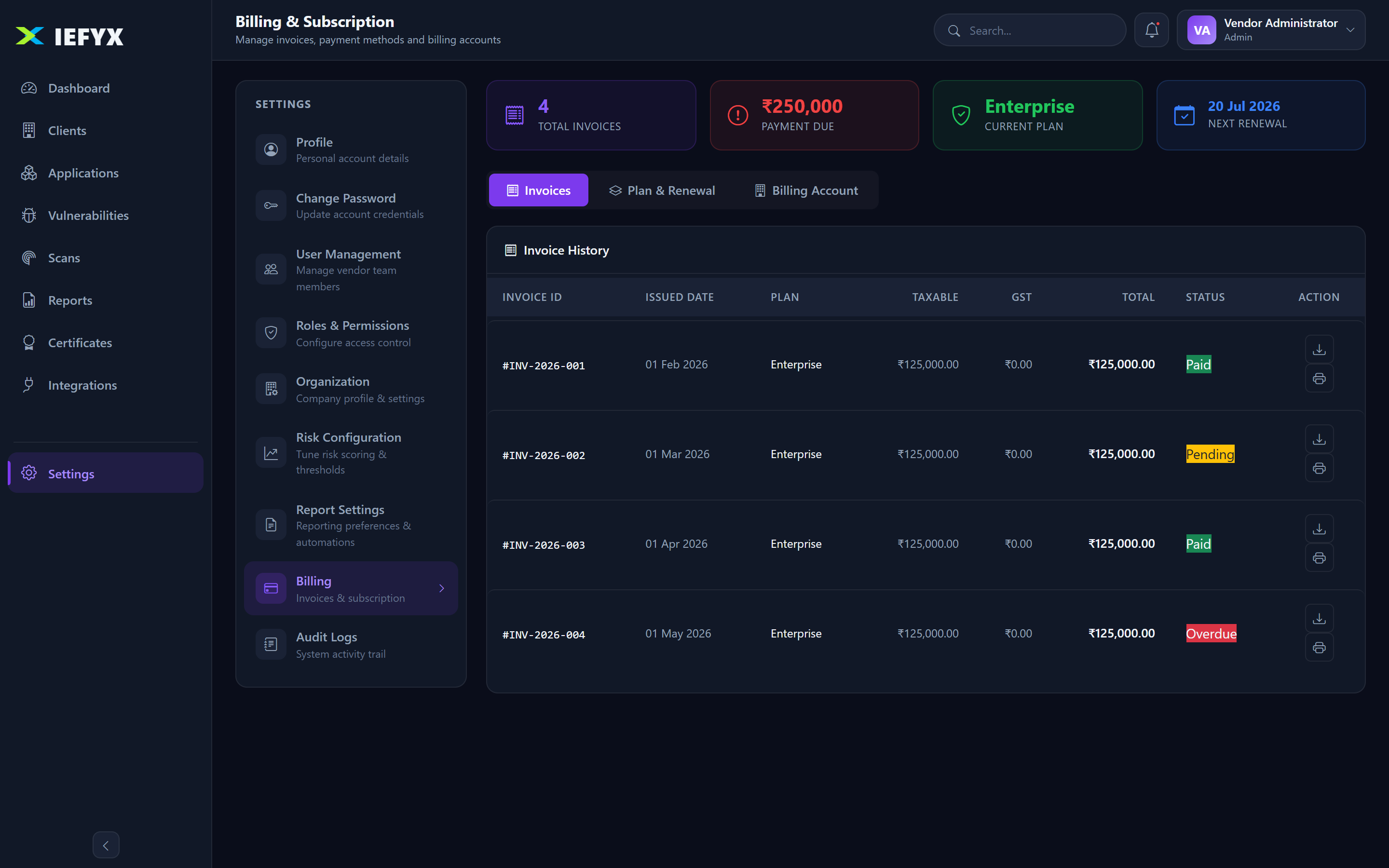
Subscription status: TRIAL · ACTIVE · PAYMENT_PENDING · EXPIRED · CANCELLED. Usage is tracked against plan limits (enforceLimit) and features gated by entitlements (requireFeature). Payments via Razorpay (HMAC-verified, replay-protected); India-compliant GST invoices (CGST/SGST or IGST) downloadable as PDF.
2.12 Audit Logs & API Access
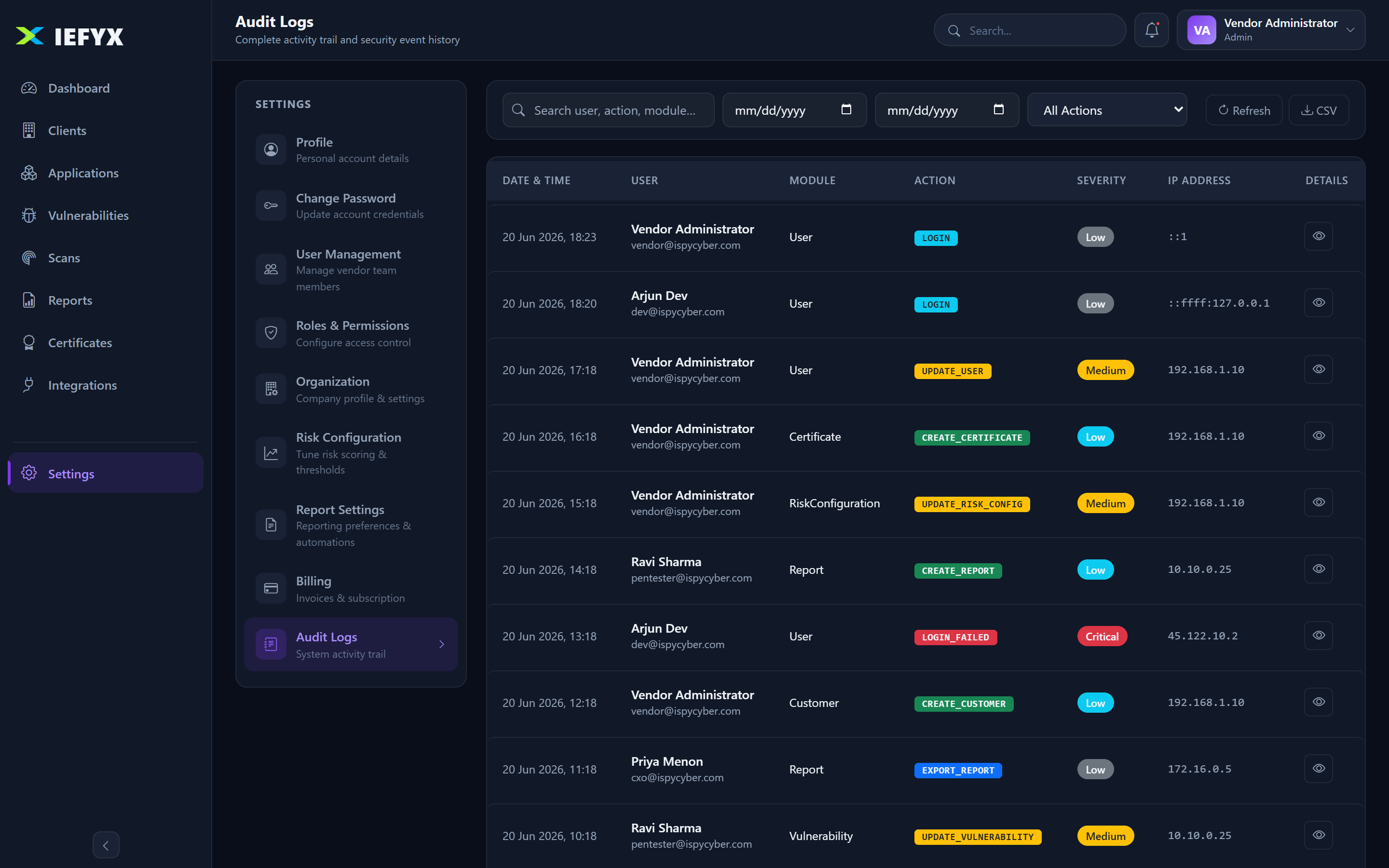
Audit logs record a full activity trail for security investigations and compliance. Admins create/revoke API keys (gated by the apiAccess entitlement) for programmatic REST access.
3. Deployment & Security Controls
3.1 SaaS Deployment (current)
- Access URL:
https://app.iefyx.com→ vendor portal at/vendor. - Browsers: latest Chrome, Edge, Firefox, Safari.
- Authentication: email + password, optional email OTP (2FA); 8-hour JWT session.
- Hosting: Linux VPS with Nginx (TLS + reverse proxy), PM2, MongoDB, Let's Encrypt; isolated Dev/UAT/Production tiers.
3.2 On-Prem Deployment
- Linux host, Node.js 20+, PM2, Nginx reverse proxy.
- MongoDB 8.x with persistent storage and backups.
- Outbound HTTPS for SMTP, Razorpay, scanner/Jira/Slack/Teams; inbound 443.
- TLS certificates, secret management, MongoDB firewalling, strict CSP.
3.3 Security Controls
| Control | Implementation |
|---|---|
| Authentication | Email + password; bcrypt (cost 12); enforced password policy. |
| MFA / 2FA | Optional per-user email OTP (4–8 digits) required at login when enabled. |
| Authorization | Portal isolation, RBAC, entitlement gating (features & limits). |
| Account protection | Lockout after 5 failed logins for 15 min; rate limiters on login/OTP/reset/scan. |
| Session | Stateless JWT (8h, unique jti); logout blacklists the token. |
| Password reset | Emailed single-use token (SHA-256 at rest, time-limited). |
| Upload integrity | Magic-byte validation; size limits. |
| Encryption / isolation | TLS in transit; secrets select:false; per-organisation scoping; soft-delete. |
4. Integrations
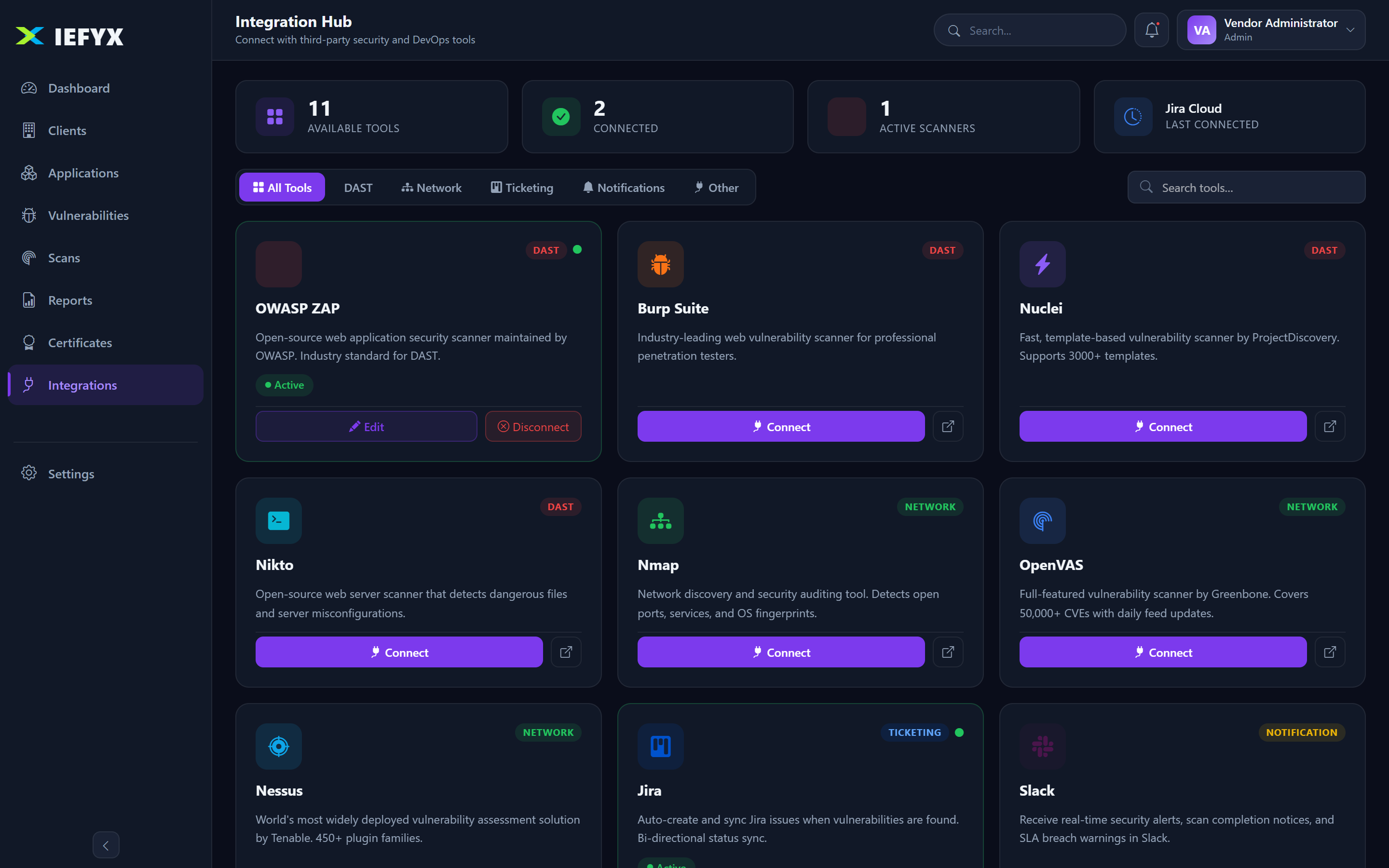
4.1 Scanners
Native adapters: OWASP ZAP, OpenVAS, Nessus, Burp Suite, Nuclei, Nikto, Nmap, plus a generic custom connector. Support trigger, status polling and findings import.
4.2 Ticketing
- Jira — push a finding to create a ticket and sync status (ticket key/URL stored on the finding).
- ServiceNow / others — Not currently available as native adapters.
4.3 Communication
- Email (SMTP) — built in (OTP, reset, notifications).
- Slack & Microsoft Teams — supported notification integrations.
4.4 Security Tools & Cloud
- SIEM — category exists; use the custom connector (dedicated adapter is Roadmap).
- EDR/XDR and AWS/Azure/GCP — Not currently available.
4.5 APIs & Webhooks
- REST API under
/api; authenticate with a Bearer JWT or Admin-created API key. - Razorpay payment webhook (HMAC-authenticated).
For step-by-step configuration, see the Integration Guide.
5. Capabilities
5.1 Centralized Data Management
Single source of truth across customers, applications, findings, reports and certificates. Benefits: reduced fragmentation, better governance, improved visibility.
5.2 Speed Pentest Reporting
PDF/HTML generation, reusable rich-text, custom templates, bulk import. Benefits: faster delivery, less manual effort, consistency.
5.3 Collaborate Effectively
Shared records, Jira push, SLA escalation, deliverables in one place. Benefits: faster remediation, clearer accountability.
5.4 Deliver Actionable Insights
Dashboard KPIs, distributions, trends, risk summaries, SLA-breach lists. Benefits: better decisions, measurable risk reduction.
5.5 Expand Service Offerings
Multi-tenant isolation lets one vendor serve many clients. Benefits: revenue growth, scalability.
5.6 Improve Report Quality
Standardized findings (CVSS/CWE/OWASP/MITRE), templates, evidence, sign-off chain. Benefits: consistency, professionalism.
5.7 Measure Risk
CVSS severity, 0–100 risk score, SLA windows, aging, trends. Benefits: objective visibility, better prioritization.
6. Use Cases
6.1 Pentest Reporting & Findings Delivery
Customer ─▶ Application(scope) ─▶ Findings(+evidence,CVSS) ─▶ Report ─▶ Certificate ─▶ Client
Benefits: faster reporting, better consistency.
6.2 Prioritizing Risk & Remediation
Risk score + severity + asset criticality + internet-facing rank what to fix first; SLA windows set deadlines; status & retest track to closure.
6.3 Continuous Threat Exposure Management (CTEM)
Recurring assessments/scans surface exposures; retests validate; SLA & trends show whether the attack surface is shrinking.
6.4 Vulnerability Lifecycle Management
Discovery → Validation → Assignment → Remediation → Verification → Closure, with full audit visibility.
6.5 Compliance & Audit Readiness
Compliance scope per application, evidence attachments, audit logs and consistent reports support audits.
7. Organization Profiles
- Enterprise teams — SecOps manage findings/scans, risk teams tune SLAs, compliance uses scope/reports, IT drives remediation, CXOs consume dashboards.
- Service providers (MSSP, consultancies) — multi-tenant client management with templated reporting.
- Government — compliance scoping, assessments, portfolio risk visibility.
- Financial institutions — PCI-DSS/ISO mapping, strict SLAs, audit-ready reports.
- Healthcare — PII/PHI tracking, HIPAA/GDPR scope, evidence-backed findings.
- Technology companies — continuous testing in the SDLC, CTEM workflows.
8. Vendor Workflows
8.1 Login
Objective: authenticate to the vendor portal.
- Go to
app.iefyx.com→ email + password → Sign In. - If 2FA is on, enter the emailed OTP.
Result: dashboard with an 8-hour session. Troubleshooting: 5 failed attempts → 15-min lockout.
8.2 MFA Setup
- Settings → Profile → enable Two-Factor Authentication.
- Next login emails an OTP; enter it.
Troubleshooting: OTP missing → check spam, use Resend OTP.
8.3 Asset Onboarding
Prerequisites: Admin/Penetration Tester; within plan limits.
- Customers → Add Customer → save.
- Applications → Add Application → select customer, set type/methodology/environment/scope/compliance/criticality → save.
Result: CUST-… and APP-… records. Troubleshooting: "limit reached" → upgrade; upload rejected → check file type.
8.4 Findings Creation & Review
- Vulnerabilities → Add Vulnerability → select application, enter CVSS (calculator), CWE/OWASP/CVE/MITRE.
- Write Impact/PoC/Remediation; attach evidence; save.
Result: VULN-… with auto severity, risk score and SLA. Troubleshooting: severity not updating → enter a valid CVSS.
8.5 Remediation & Retest
- Open finding → change status (Open→In Progress→Fixed→Closed) or push to Jira.
- Use the retest workflow to validate (Requested→Passed/Failed).
8.6 Evidence Upload
- Open finding → Attachments → Upload, or embed screenshots in the PoC editor.
Troubleshooting: rejected → confirm allowed type/size.
8.7 Risk Acceptance
- Open finding → set Hold/Closed with justification.
- Follow approval governance (Risk Configuration).
8.8 Report Generation & Download
Prerequisites: Admin/Penetration Tester; findings recorded; within monthly report limit.
- Reports → New Report → select application, set testing type/version/narrative/template.
- Generate PDF or HTML → download.
Troubleshooting: fails → ensure findings exist, required fields set, within report limit.
8.9 Dashboard Monitoring
- Open Dashboard → review KPIs, charts, trends.
- Adjust the time-period filter.
8.10 Subscription Management
Prerequisites: Admin role.
- Settings → Billing → review plan, status, usage.
- Pay/upgrade via Razorpay; download GST invoices.
Troubleshooting: read-only after trial → activate a paid plan.
8.11 User Management
Prerequisites: Admin; within users limit.
- Settings → User Management → Add User → set role & scope.
- Review Role & Permission; deactivate departed users.
9. Glossary
| Term | Meaning |
|---|---|
| Organisation | The tenant boundary — all vendor data is scoped to it. |
| Customer | A client organization the vendor serves. |
| Application | An asset under assessment with full scope metadata. |
| Vulnerability / Finding | A security issue recorded against an application. |
| CVSS | Common Vulnerability Scoring System (0–10) → drives severity. |
| SLA | Remediation deadline per severity, from Risk Configuration. |
| Retest | Validation that a finding was remediated. |
| Entitlement | Plan-derived feature flag or usage limit. |
| CTEM | Continuous Threat Exposure Management. |
| RBAC | Role-Based Access Control. |
10. Version History
| Version | Date | Summary |
|---|---|---|
| 1.0 | 2026-06-20 | Initial publication generated from source analysis, with live screenshots of the vendor portal. |